> ## Documentation Index
> Fetch the complete documentation index at: https://docs.markifact.com/llms.txt
> Use this file to discover all available pages before exploring further.
# AI Agent
> Build autonomous AI agents that call other apps and tools dynamically based on user input.
The **AI Agent** node represents a fundamental shift from traditional workflows to **agentic workflows**. Instead of you defining each step and input manually, the AI Agent autonomously decides which tools to use and how to fill their inputs based on the conversation context.
Think of it as transforming your workflow from a rigid sequence of predefined steps into an intelligent assistant that can dynamically choose and execute the right actions.
The AI Agent has a **different visual structure** compared to other nodes:
* **Right handle**: Connect to other nodes (like Send Message, Email, etc.) - works like any normal node
* **Bottom handle**: Connect AI Tools - this is unique to AI Agent and allows you to give the AI access to other Markifact nodes as tools it can call autonomously
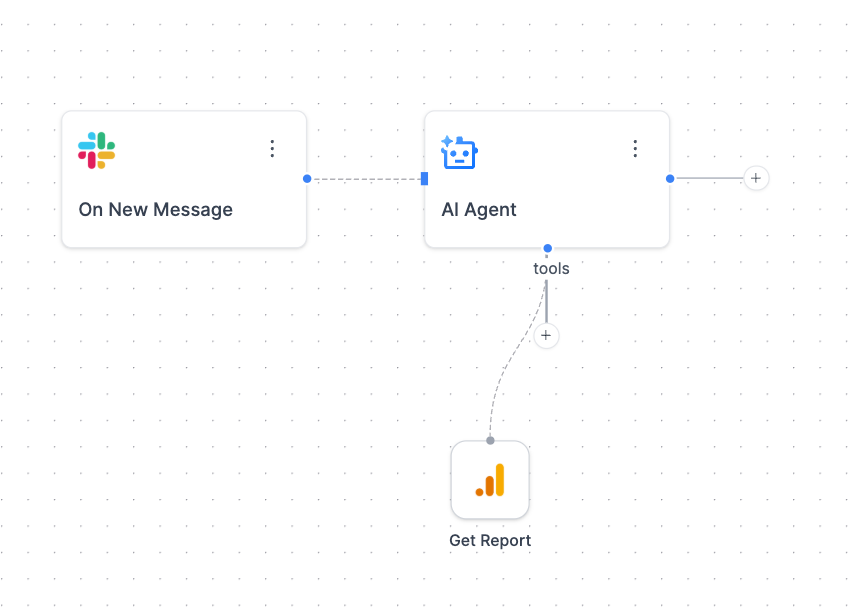 This dual-handle design reflects its dual nature: it's both a processing node (like others) and a tool coordinator (unique capability).
***
## Traditional Workflow vs. Agentic Workflow
### Traditional AI Workflow
* **You define**: Every input, every connection, every step
* **AI role**: Processes data you provide in a predetermined sequence
* **Example**: Trigger → Get GA4 Data → Analyze Data → Send Email
### Agentic Workflow
* **AI decides**: Which tools to use, what inputs to provide, when to execute
* **Your role**: Provide high-level instructions and available tools
* **Example**: "Analyze our marketing performance" → AI autonomously pulls GA4 data, analyzes trends, and suggests actions
***
## When to Use AI Agent
AI Agent excels at:
* **Chatbots and conversational interfaces** (Slack bots, customer support)
* **Dynamic data analysis** where the AI chooses relevant data sources
* **Multi-step research tasks** that require different tools based on findings
* **Adaptive workflows** that change based on user questions
### Perfect Use Case: Slack Chatbot
Build a marketing assistant that responds to questions in Slack:
1. **Trigger**: Slack → On New Message
2. **AI Agent**: Process the message and decide what data to fetch
3. **Tools**: GA4 Get Report, Google Ads Get Report, Meta Ads Get Report (as AI tools)
4. **Response**: Slack → Send Channel Message
The AI automatically chooses which marketing platform to query based on the user's question.
***
## Key Features
### ✨ Smart Input Detection
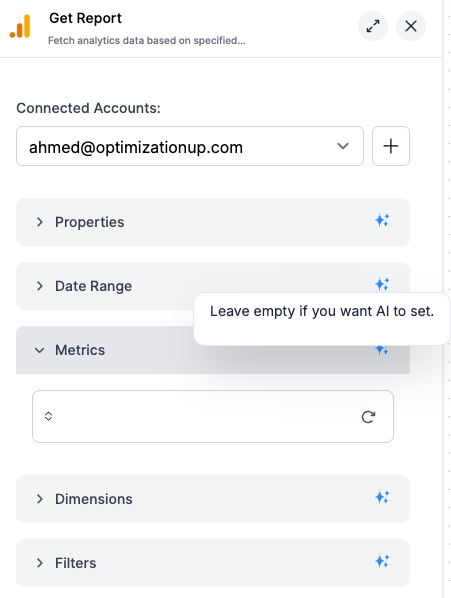
Each input field shows a sparkle icon (✨) with the hint: **"Leave empty if you want AI to set"**
This means you can let the AI:
* Choose date ranges dynamically
* Select appropriate metrics
* Fill in contextual parameters
This dual-handle design reflects its dual nature: it's both a processing node (like others) and a tool coordinator (unique capability).
***
## Traditional Workflow vs. Agentic Workflow
### Traditional AI Workflow
* **You define**: Every input, every connection, every step
* **AI role**: Processes data you provide in a predetermined sequence
* **Example**: Trigger → Get GA4 Data → Analyze Data → Send Email
### Agentic Workflow
* **AI decides**: Which tools to use, what inputs to provide, when to execute
* **Your role**: Provide high-level instructions and available tools
* **Example**: "Analyze our marketing performance" → AI autonomously pulls GA4 data, analyzes trends, and suggests actions
***
## When to Use AI Agent
AI Agent excels at:
* **Chatbots and conversational interfaces** (Slack bots, customer support)
* **Dynamic data analysis** where the AI chooses relevant data sources
* **Multi-step research tasks** that require different tools based on findings
* **Adaptive workflows** that change based on user questions
### Perfect Use Case: Slack Chatbot
Build a marketing assistant that responds to questions in Slack:
1. **Trigger**: Slack → On New Message
2. **AI Agent**: Process the message and decide what data to fetch
3. **Tools**: GA4 Get Report, Google Ads Get Report, Meta Ads Get Report (as AI tools)
4. **Response**: Slack → Send Channel Message
The AI automatically chooses which marketing platform to query based on the user's question.
***
## Key Features
### ✨ Smart Input Detection
Each input field shows a sparkle icon (✨) with the hint: **"Leave empty if you want AI to set"**
This means you can let the AI:
* Choose date ranges dynamically
* Select appropriate metrics
* Fill in contextual parameters
 ### Conversation Memory
The **Conversation ID** maintains context across multiple messages:
* Links related messages (like Slack thread IDs)
* Remembers previous exchanges
* Treats new threads as fresh conversations
### AI Tools Integration
Connect other Markifact nodes as "tools" that the AI can call:
* Not all nodes are available as AI tools yet (we're rolling them out gradually)
* Click **Add Tool** to see currently available AI tools
* AI decides when and how to use each tool
***
## Inputs
| Field | Type | Required | Description |
| ------------------- | ----------------- | -------- | ------------------------------------------------------------------------------------------------------- |
| **Instructions** | Dynamic Text Area | ✅ | High-level instructions for your AI agent (e.g., "You are a helpful marketing assistant") |
| **Message** | Dynamic Text Area | ✅ | The user's input or question that the agent should respond to |
| **Model** | Model Selector | ✅ | Choose your AI model (GPT-4.1 recommended for complex tool usage) |
| **Conversation ID** | Dynamic Text | ❌ | Unique identifier to maintain conversation history (use Slack thread\_id, email conversation\_id, etc.) |
| **Schema Fields** | Schema Builder | ❌ | Define structured output format if you need consistent data structure |
***
## Example: Slack Marketing Bot
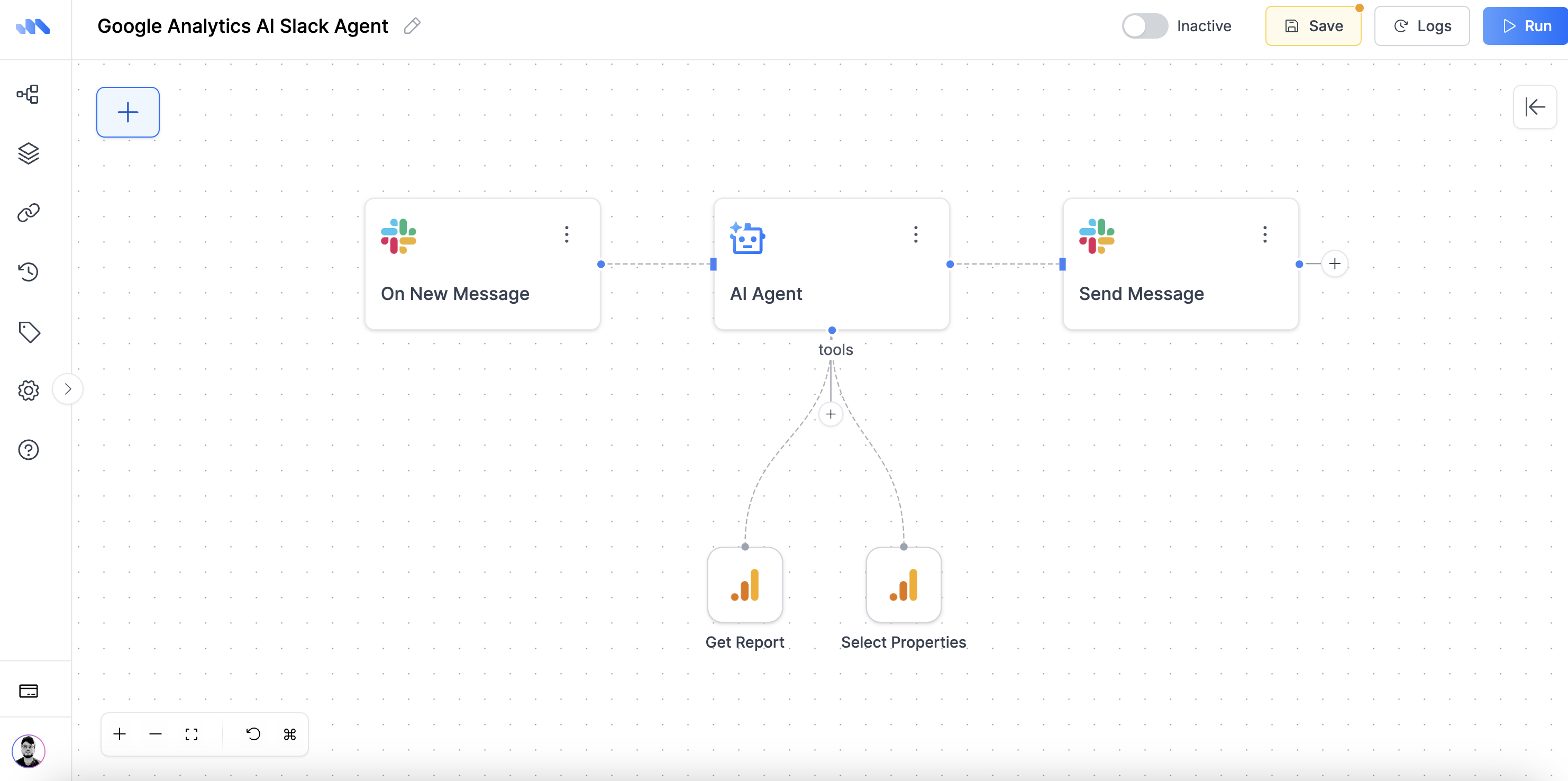
Here's how to build a Slack bot that answers marketing questions:
### Workflow Setup
```
Slack: On New Message → AI Agent → Slack: Send Channel Message
↓
AI Tools:
• GA4 Get Report
• Google Ads Get Report
• Meta Ads Get Report
```
### Conversation Memory
The **Conversation ID** maintains context across multiple messages:
* Links related messages (like Slack thread IDs)
* Remembers previous exchanges
* Treats new threads as fresh conversations
### AI Tools Integration
Connect other Markifact nodes as "tools" that the AI can call:
* Not all nodes are available as AI tools yet (we're rolling them out gradually)
* Click **Add Tool** to see currently available AI tools
* AI decides when and how to use each tool
***
## Inputs
| Field | Type | Required | Description |
| ------------------- | ----------------- | -------- | ------------------------------------------------------------------------------------------------------- |
| **Instructions** | Dynamic Text Area | ✅ | High-level instructions for your AI agent (e.g., "You are a helpful marketing assistant") |
| **Message** | Dynamic Text Area | ✅ | The user's input or question that the agent should respond to |
| **Model** | Model Selector | ✅ | Choose your AI model (GPT-4.1 recommended for complex tool usage) |
| **Conversation ID** | Dynamic Text | ❌ | Unique identifier to maintain conversation history (use Slack thread\_id, email conversation\_id, etc.) |
| **Schema Fields** | Schema Builder | ❌ | Define structured output format if you need consistent data structure |
***
## Example: Slack Marketing Bot
Here's how to build a Slack bot that answers marketing questions:
### Workflow Setup
```
Slack: On New Message → AI Agent → Slack: Send Channel Message
↓
AI Tools:
• GA4 Get Report
• Google Ads Get Report
• Meta Ads Get Report
```
 ### Configuration
**Instructions:**
```
You are a helpful AI agent named Markifact.
Your role is to assist users in querying and analyzing Google Analytics (GA4) accounts and generating reports based on their requests.
Important guidelines:
- Never assume which account the user wants to query—always ask if it's not provided. Use the 'select accounts' tool to fetch the list of accounts the user has access to.
- If the user doesn’t specify a date range, be sure to ask for it before proceeding.
```
**Message:** Connect the message from your Slack trigger
**Conversation ID:** Connect the conversation ID from your Slack trigger for memory
### User Interactions
**User:** "How did our Google Ads perform last week?"
**AI Agent:** Automatically calls Google Ads Get Report tool, responds with insights
**User:** "Compare that to Meta Ads" (in same thread)
**AI Agent:** Remembers previous context, calls Meta Ads Get Report, provides comparison
***
## Memory and Context
The **Conversation ID** is crucial for maintaining context:
* **Same Conversation ID**: AI remembers previous exchanges, builds on context
* **Different Conversation ID**: Fresh start, no memory of previous conversations
* **No Conversation ID**: Each message is treated independently
This works for any platform - Slack threads, email conversations, or chat sessions.
***
## Available AI Tools
You can see the list of available AI tools by clicking the **Add AI Tool** handle when configuring your AI Agent. The available tools are constantly expanding as we roll out more integrations.
***
## Output
The AI Agent returns structured output that can include:
* Generated text response
* Data from called tools
* Structured fields (if schema is defined)
* Tool execution logs and results
Connect the output to:
* **Slack/Teams**: Send responses back to users
* **Email**: Send detailed reports
* **Sheets**: Log conversations and data
***
## Credit Cost
Cost depends on the selected model. See the [Credits & Usage](/credits) page for details.
Also, for each tool called by the AI Agent, there may be additional costs based on the specific node's credit usage (e.g., GA4 Get Report, Google Ads Get Report).
The total cost for an AI Agent run is the sum of the AI model cost and any tool costs incurred during execution.
***
## Frequently Asked Questions
**Check your Conversation ID setup:**
* Make sure you're connecting the Conversation ID from your trigger
* For Slack: Connect the conversation ID field from your Slack trigger
* For email: Connect the thread/conversation ID from your email trigger
* Missing Conversation ID = fresh conversation every time
**Common mistakes:**
* Forgetting to connect the Conversation ID field
* Using the wrong field from your trigger (like timestamp instead of conversation ID)
| Regular Nodes | AI Tools |
| --------------------------------- | ---------------------------------------------- |
| You configure all inputs manually | AI fills inputs automatically based on context |
| Fixed execution order | AI decides when to use them |
| You connect them in sequence | AI calls them dynamically |
| Always execute | Only execute when AI deems necessary |
**Example:**
* **Regular GA4 node**: You set date range, metrics, dimensions
* **GA4 AI Tool**: AI decides what data to pull based on user's question
We're gradually rolling out nodes as AI tools because:
* Each node needs special AI integration
* Complex nodes require additional prompt engineering
* We prioritize the most commonly used nodes first
Use **Select Accounts** AI tool when:
* You want AI to choose the right account dynamically
* You have multiple ad accounts/properties
* User might ask about different accounts ("Show me data for our EU account")
Pre-select your account when:
* You always want data from the same account
* You have only one account connected
* You want to limit AI to specific data sources
**Example:**
```
User: "How did our US Google Ads perform?"
→ AI uses Select Accounts tool to find US account, then gets data
vs.
Pre-selected account (faster, but less flexible)
→ AI directly gets data from your chosen account
```
**Common causes:**
* Too many AI tools connected (AI tries to decide between many options)
* Large date ranges in data requests
* Complex instructions that confuse the AI
**Solutions:**
* Limit AI tools to what you actually need
* Use clear, specific instructions
* For heavy data tasks, consider pre-filtering with regular nodes
**Better Instructions:**
```
❌ Vague: "Help with marketing"
✅ Specific: "Analyze marketing performance. Always include CTR and conversion data. Keep responses under 150 words."
```
**Model Selection:**
* GPT-4.1: Best for complex tool usage
* GPT-4o: Faster for simple questions
* GPT-4.1 Mini: Cost-effective for basic tasks
**Start small:** 2-3 related tools (e.g., GA4 + Google Ads + Meta Ads)\
**Add gradually:** Test behavior before adding more\
**Quality over quantity:** Better to have 3 relevant tools than 10 confusing ones
**In the message:** "Use Google Ads data to show me..."\
**In instructions:** "Always check GA4 first, then Google Ads if needed"\
**Pre-filtering:** Use regular nodes before AI Agent for must-have data
AI Agent will:
1. Try alternative approaches
2. Inform you about the failure
3. Provide partial results if possible
4. Suggest manual steps if needed
**Best practice:** Test your tools individually before adding them to AI Agent.
**GPT-4.1:** Best for complex tool usage and detailed analysis, but slower and more expensive
**GPT-4o:** Good balance of speed and capability for most marketing tasks
**GPT-4.1 Mini & Nano:** Cost-effective and fast response times, ideal for:
* Simple questions and quick responses
* High-volume chatbot interactions
* Basic data queries
**Recommendation:** Start with GPT-4o for most use cases, upgrade to GPT-4.1 for complex analysis, or downgrade to Mini/Nano for speed and cost savings.
Response time depends on the AI model you're using, not Markifact:
**Model Processing Times:**
* **GPT-4.1:** Slower but most capable, especially when running Python code for calculations
* **GPT-4o:** Moderate speed with good capabilities
* **Mini/Nano:** Fastest response times
**What slows down responses:**
* Complex tool usage requiring multiple API calls
* Python code execution for data analysis
* Large datasets being processed
* Multiple tools being evaluated
**To speed up responses:**
* Use Mini or Nano models for simple questions
* Limit the number of connected AI tools
* Use more specific instructions to reduce decision time
This happens when you click the **Run** button in the Markifact UI to test a workflow with a Slack trigger.
**Why it shows:** Since your workflow starts with "Slack: On New Message," there's no actual Slack message when you test manually, so Markifact shows this placeholder.
**How to test properly:**
1. **Activate your workflow** by clicking the switch button at the top
2. Go to Slack and mention your bot: `@markifact how did our ads perform?`
3. Check the **History/Runs** tab to see if your message was received
**Alternative testing method:**
1. Temporarily remove the Slack message input from AI Agent
2. Write your test message manually in the Message field
3. Test using the Run button
4. Reconnect the Slack message input when ready to go live
**Most common issues:**
**1. Workflow not active**
* Check if the workflow switch is turned ON (top right)
* Inactive workflows don't respond to triggers
**2. Wrong channel configuration**
* Your Slack trigger might be set to listen only to specific channels
* Check your "On New Message" trigger settings
* Make sure you're messaging in the correct channel
**3. Bot not mentioned**
* Some configurations require mentioning the bot: `@markifact`
* Try both with and without mentioning the bot
**How to troubleshoot:**
* Go to **History/Runs** tab to see if the message was received
* Check if the workflow triggered at all
* Look at the logs to see where it might have stopped
This happens when you have **multiple workflows** with the same Slack trigger responding to the same channel.
**Solutions:**
**Option 1: Use different channels**
* Set up each AI Agent for different Slack channels
* Example: #marketing-reports, #ad-performance, #analytics
**Option 2: Combine into one workflow**
* Use one AI Agent with multiple tools
* Let the AI decide which tools to use based on the question
* More efficient and avoids duplicate responses
**Option 3: Add channel filters**
* Configure each workflow's Slack trigger to listen to specific channels only
* This prevents overlap between different AI Agents
**Best practice:** One AI Agent per channel, or one comprehensive AI Agent with all needed tools.
### Configuration
**Instructions:**
```
You are a helpful AI agent named Markifact.
Your role is to assist users in querying and analyzing Google Analytics (GA4) accounts and generating reports based on their requests.
Important guidelines:
- Never assume which account the user wants to query—always ask if it's not provided. Use the 'select accounts' tool to fetch the list of accounts the user has access to.
- If the user doesn’t specify a date range, be sure to ask for it before proceeding.
```
**Message:** Connect the message from your Slack trigger
**Conversation ID:** Connect the conversation ID from your Slack trigger for memory
### User Interactions
**User:** "How did our Google Ads perform last week?"
**AI Agent:** Automatically calls Google Ads Get Report tool, responds with insights
**User:** "Compare that to Meta Ads" (in same thread)
**AI Agent:** Remembers previous context, calls Meta Ads Get Report, provides comparison
***
## Memory and Context
The **Conversation ID** is crucial for maintaining context:
* **Same Conversation ID**: AI remembers previous exchanges, builds on context
* **Different Conversation ID**: Fresh start, no memory of previous conversations
* **No Conversation ID**: Each message is treated independently
This works for any platform - Slack threads, email conversations, or chat sessions.
***
## Available AI Tools
You can see the list of available AI tools by clicking the **Add AI Tool** handle when configuring your AI Agent. The available tools are constantly expanding as we roll out more integrations.
***
## Output
The AI Agent returns structured output that can include:
* Generated text response
* Data from called tools
* Structured fields (if schema is defined)
* Tool execution logs and results
Connect the output to:
* **Slack/Teams**: Send responses back to users
* **Email**: Send detailed reports
* **Sheets**: Log conversations and data
***
## Credit Cost
Cost depends on the selected model. See the [Credits & Usage](/credits) page for details.
Also, for each tool called by the AI Agent, there may be additional costs based on the specific node's credit usage (e.g., GA4 Get Report, Google Ads Get Report).
The total cost for an AI Agent run is the sum of the AI model cost and any tool costs incurred during execution.
***
## Frequently Asked Questions
**Check your Conversation ID setup:**
* Make sure you're connecting the Conversation ID from your trigger
* For Slack: Connect the conversation ID field from your Slack trigger
* For email: Connect the thread/conversation ID from your email trigger
* Missing Conversation ID = fresh conversation every time
**Common mistakes:**
* Forgetting to connect the Conversation ID field
* Using the wrong field from your trigger (like timestamp instead of conversation ID)
| Regular Nodes | AI Tools |
| --------------------------------- | ---------------------------------------------- |
| You configure all inputs manually | AI fills inputs automatically based on context |
| Fixed execution order | AI decides when to use them |
| You connect them in sequence | AI calls them dynamically |
| Always execute | Only execute when AI deems necessary |
**Example:**
* **Regular GA4 node**: You set date range, metrics, dimensions
* **GA4 AI Tool**: AI decides what data to pull based on user's question
We're gradually rolling out nodes as AI tools because:
* Each node needs special AI integration
* Complex nodes require additional prompt engineering
* We prioritize the most commonly used nodes first
Use **Select Accounts** AI tool when:
* You want AI to choose the right account dynamically
* You have multiple ad accounts/properties
* User might ask about different accounts ("Show me data for our EU account")
Pre-select your account when:
* You always want data from the same account
* You have only one account connected
* You want to limit AI to specific data sources
**Example:**
```
User: "How did our US Google Ads perform?"
→ AI uses Select Accounts tool to find US account, then gets data
vs.
Pre-selected account (faster, but less flexible)
→ AI directly gets data from your chosen account
```
**Common causes:**
* Too many AI tools connected (AI tries to decide between many options)
* Large date ranges in data requests
* Complex instructions that confuse the AI
**Solutions:**
* Limit AI tools to what you actually need
* Use clear, specific instructions
* For heavy data tasks, consider pre-filtering with regular nodes
**Better Instructions:**
```
❌ Vague: "Help with marketing"
✅ Specific: "Analyze marketing performance. Always include CTR and conversion data. Keep responses under 150 words."
```
**Model Selection:**
* GPT-4.1: Best for complex tool usage
* GPT-4o: Faster for simple questions
* GPT-4.1 Mini: Cost-effective for basic tasks
**Start small:** 2-3 related tools (e.g., GA4 + Google Ads + Meta Ads)\
**Add gradually:** Test behavior before adding more\
**Quality over quantity:** Better to have 3 relevant tools than 10 confusing ones
**In the message:** "Use Google Ads data to show me..."\
**In instructions:** "Always check GA4 first, then Google Ads if needed"\
**Pre-filtering:** Use regular nodes before AI Agent for must-have data
AI Agent will:
1. Try alternative approaches
2. Inform you about the failure
3. Provide partial results if possible
4. Suggest manual steps if needed
**Best practice:** Test your tools individually before adding them to AI Agent.
**GPT-4.1:** Best for complex tool usage and detailed analysis, but slower and more expensive
**GPT-4o:** Good balance of speed and capability for most marketing tasks
**GPT-4.1 Mini & Nano:** Cost-effective and fast response times, ideal for:
* Simple questions and quick responses
* High-volume chatbot interactions
* Basic data queries
**Recommendation:** Start with GPT-4o for most use cases, upgrade to GPT-4.1 for complex analysis, or downgrade to Mini/Nano for speed and cost savings.
Response time depends on the AI model you're using, not Markifact:
**Model Processing Times:**
* **GPT-4.1:** Slower but most capable, especially when running Python code for calculations
* **GPT-4o:** Moderate speed with good capabilities
* **Mini/Nano:** Fastest response times
**What slows down responses:**
* Complex tool usage requiring multiple API calls
* Python code execution for data analysis
* Large datasets being processed
* Multiple tools being evaluated
**To speed up responses:**
* Use Mini or Nano models for simple questions
* Limit the number of connected AI tools
* Use more specific instructions to reduce decision time
This happens when you click the **Run** button in the Markifact UI to test a workflow with a Slack trigger.
**Why it shows:** Since your workflow starts with "Slack: On New Message," there's no actual Slack message when you test manually, so Markifact shows this placeholder.
**How to test properly:**
1. **Activate your workflow** by clicking the switch button at the top
2. Go to Slack and mention your bot: `@markifact how did our ads perform?`
3. Check the **History/Runs** tab to see if your message was received
**Alternative testing method:**
1. Temporarily remove the Slack message input from AI Agent
2. Write your test message manually in the Message field
3. Test using the Run button
4. Reconnect the Slack message input when ready to go live
**Most common issues:**
**1. Workflow not active**
* Check if the workflow switch is turned ON (top right)
* Inactive workflows don't respond to triggers
**2. Wrong channel configuration**
* Your Slack trigger might be set to listen only to specific channels
* Check your "On New Message" trigger settings
* Make sure you're messaging in the correct channel
**3. Bot not mentioned**
* Some configurations require mentioning the bot: `@markifact`
* Try both with and without mentioning the bot
**How to troubleshoot:**
* Go to **History/Runs** tab to see if the message was received
* Check if the workflow triggered at all
* Look at the logs to see where it might have stopped
This happens when you have **multiple workflows** with the same Slack trigger responding to the same channel.
**Solutions:**
**Option 1: Use different channels**
* Set up each AI Agent for different Slack channels
* Example: #marketing-reports, #ad-performance, #analytics
**Option 2: Combine into one workflow**
* Use one AI Agent with multiple tools
* Let the AI decide which tools to use based on the question
* More efficient and avoids duplicate responses
**Option 3: Add channel filters**
* Configure each workflow's Slack trigger to listen to specific channels only
* This prevents overlap between different AI Agents
**Best practice:** One AI Agent per channel, or one comprehensive AI Agent with all needed tools.